
No, Warden is not paid. It is free to invite and use — all eight modules are available with no paywall or subscription required, however we do offer some additional features with our Warden Plus subscription.
Warden is your go-to management bot for ER:LC roleplay Discord servers — moderation, verification, shift logging, sessions, infractions, applications and live logs in a single system.
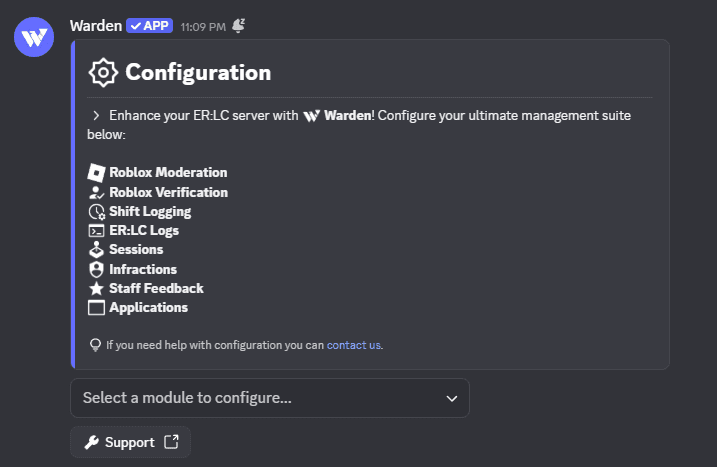
Generic moderation bots weren't made for roleplay servers. Warden replaces the patchwork of tools most ER:LC communities rely on — with a single system your staff actually wants to use.
Purpose-built for Emergency Response: Liberty County servers, not adapted from a generic mod bot.
Stop juggling Melonly, custom bots, and spreadsheets. One bot to rule them all.
Every module is included at no cost. No subscriptions, no premium tiers, and no features locked behind a paywall. However, we do offer some additional features with our Warden Plus subscription.
Set up your server in minutes with slash commands and a straightforward configuration flow. Enable only the modules you need and leave the rest off.
One bot built specifically for ER:LC. No bloat, no duct-tape — just the tools your staff team actually uses every day.
Enforce your server rules with ease. Issue punishments to players and keep a centralized system to maintain order and accountability across every server you run.
Link Discord accounts to Roblox profiles with confidence. Gate your community, confirm member identities.
Let staff effortlessly log their hours. Track shift times and see a live list of who's currently on duty — no spreadsheets required.
Connect your ER:LC server for real-time power — RDM detection, auto punishments, staff requests, live command logs, and self-updating status channels.
Start your roleplay sessions with ease. Every tool you need to manage them — from automatic session starts and shutdowns to votes and announcements.
Keep your team compliant with disciplinary actions. Infraction staff who violate guidelines and keep a clear paper-trail for every decision.
Give your team a voice with structured feedback cycles. Collect insights, track improvement, and build a culture of accountability across every rank.
Open recruitment with custom application forms. Review submissions, accept or deny with one click, and automate role assignments when candidates are approved.
From invited to fully configured, most servers are ready in under three minutes.
Add Warden to your Discord server with the invite button, and transform your server into a fortress.
Invite Warden →In your server, run /config or go to the dashboard to walk through initial configuration. Adjust anything later from the same command.
Turn on only what you need: moderation, verification, shift logging, ER:LC logs, sessions, and more. Each module is independent, no bloat, no extra bots.
Get setup help →You are a few clicks away from transforming your ER:LC server to a simple and powerful system!
Invite Warden